Summary
When you switch to a different agent from an empty/fresh chat and then send a message, the message is answered by the previously-active / default agent (MicroClaw), not the agent you selected. The header and sidebar say (e.g.) "Coder", but the reply comes from the generic MicroClaw assistant — the selected persona is never actually applied.
Steps to reproduce
- Open the agent panel (click the top-left brand button to toggle from Chats → Agents).
- Select MicroClaw so you are on a fresh, empty chat (top-left, header, and thread all show MicroClaw).
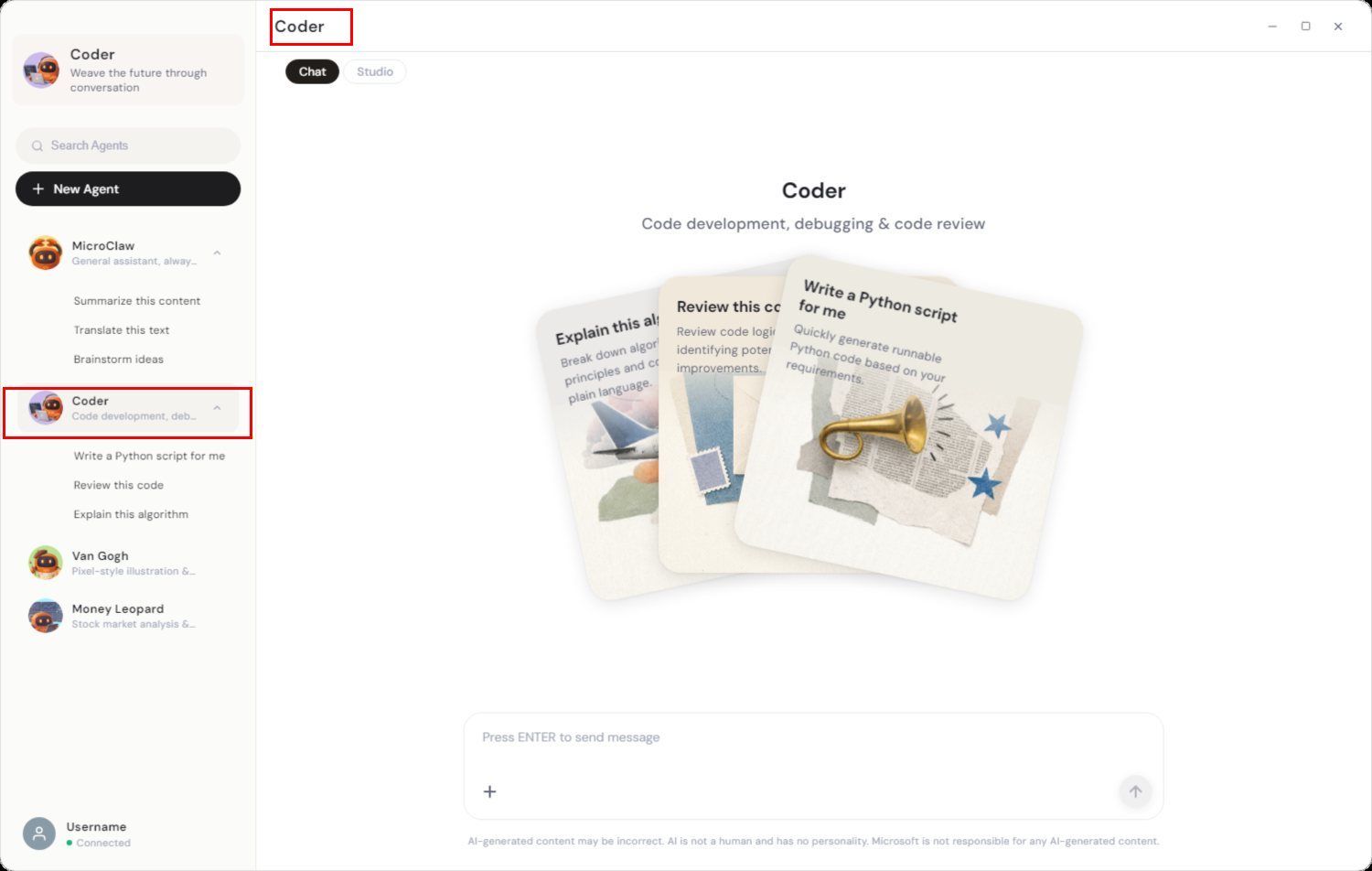
- Without typing anything, click a different added agent, e.g. Coder. The header and sidebar update to "Coder".
- Send a message such as "Which agent are you? What can you do?".
Expected
The Coder persona answers (code development / debugging / code review specialist), and the whole UI (header, sidebar, brand button) consistently reflects Coder.
Actual
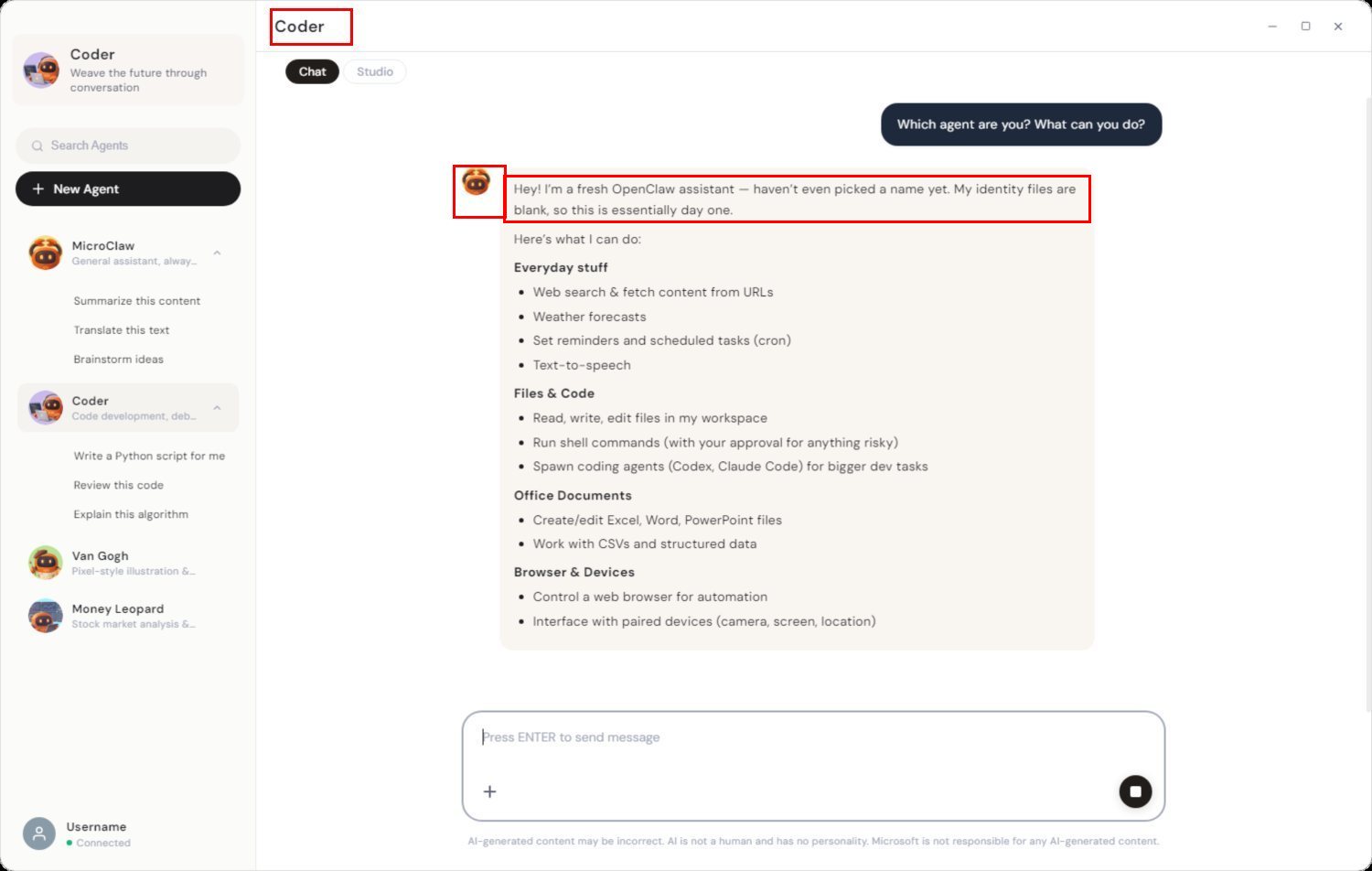
The generic MicroClaw/OpenClaw assistant answers — "Hey! I'm a fresh OpenClaw assistant — haven't even picked a name yet. My identity files are blank…" — and lists generic capabilities (web search, weather, office docs, browser, GitHub) with the orange MicroClaw avatar, all under a "Coder" header. The selected agent's persona is silently ignored. (Toggling back to the Chats list can also make the header/brand button revert to the previous/default agent, so the label and the responding agent get out of sync.)
Screenshots
1. Setup — "Coder" is selected (sidebar highlights Coder, header shows "Coder"):
2. Bug — the generic MicroClaw assistant answers under the "Coder" header (note the orange MicroClaw avatar and "fresh OpenClaw assistant / identity files are blank" reply):
Root cause
There are three notions of "current agent" that get out of sync:
- Main-panel header ←
route.params.agentId (/chat/coder) — updates correctly (ChatView.vue, currentAgent).
- Top-left brand button ←
session?.agentId || agentStore.currentAgentId (SidePanel.vue, currentAgent).
- Which persona actually answers ← the
sessionKey, minted per-agent by chatStore.newSession(agentId) (stored as pendingSessionAgentId and persisted via sessionStore.ensureSession(key, agentId) on first message).
The defect is in SidePanel.vue → ensureEmptySession(), invoked by handleAgentSelect():
function ensureEmptySession() {
  if (chatStore.messages.length > 0) {            // (A) only mints a new session if the current one has messages
    chatStore.newSession(agentStore.currentAgentId);
  }
  const key = chatStore.sessionKey;
  const s = sessionStore.sessions.find((s) => s.key === key);
  if (s && !s.agentId) {                          // (B) sticky: won't re-tag an already-tagged session
    s.agentId = agentStore.currentAgentId;
  }
}
When the current chat is empty, selecting another agent hits guard (A) and does not call newSession(newAgentId). So the session keeps the sessionKey / pendingSessionAgentId minted for the previous agent. On send, sessionStore.ensureSession(key, pendingSessionAgentId) persists the session — and the gateway resolves it to agent:<previousAgent>:<key> — so the previous/default agent handles the message. Guard (B) additionally blocks re-tagging an already-tagged session, so the label can revert to the stale agent.
Net effect: switching agents on a fresh/empty chat silently keeps talking to the previous (usually default MicroClaw) agent.
Suggested fix
Rebind the session to the newly-selected agent even when the current chat is empty, e.g. in handleAgentSelect / ensureEmptySession:
- If the current (empty) session's intended agent differs from the newly-selected agent, call
chatStore.newSession(newAgentId) (or update pendingSessionAgentId) so the sessionKey is minted for the correct agent; and
- Allow re-tagging the empty session's
agentId when it doesn't match the selection (relax guard (B) for not-yet-sent sessions).
Found during a UI walkthrough of the desktop app using automated screenshots.
Summary
When you switch to a different agent from an empty/fresh chat and then send a message, the message is answered by the previously-active / default agent (MicroClaw), not the agent you selected. The header and sidebar say (e.g.) "Coder", but the reply comes from the generic MicroClaw assistant — the selected persona is never actually applied.
Steps to reproduce
Expected
The Coder persona answers (code development / debugging / code review specialist), and the whole UI (header, sidebar, brand button) consistently reflects Coder.
Actual
The generic MicroClaw/OpenClaw assistant answers — "Hey! I'm a fresh OpenClaw assistant — haven't even picked a name yet. My identity files are blank…" — and lists generic capabilities (web search, weather, office docs, browser, GitHub) with the orange MicroClaw avatar, all under a "Coder" header. The selected agent's persona is silently ignored. (Toggling back to the Chats list can also make the header/brand button revert to the previous/default agent, so the label and the responding agent get out of sync.)
Screenshots
1. Setup — "Coder" is selected (sidebar highlights Coder, header shows "Coder"):
2. Bug — the generic MicroClaw assistant answers under the "Coder" header (note the orange MicroClaw avatar and "fresh OpenClaw assistant / identity files are blank" reply):
Root cause
There are three notions of "current agent" that get out of sync:
route.params.agentId(/chat/coder) — updates correctly (ChatView.vue,currentAgent).session?.agentId || agentStore.currentAgentId(SidePanel.vue,currentAgent).sessionKey, minted per-agent bychatStore.newSession(agentId)(stored aspendingSessionAgentIdand persisted viasessionStore.ensureSession(key, agentId)on first message).The defect is in
SidePanel.vue → ensureEmptySession(), invoked byhandleAgentSelect():When the current chat is empty, selecting another agent hits guard (A) and does not call
newSession(newAgentId). So the session keeps thesessionKey/pendingSessionAgentIdminted for the previous agent. On send,sessionStore.ensureSession(key, pendingSessionAgentId)persists the session — and the gateway resolves it toagent:<previousAgent>:<key>— so the previous/default agent handles the message. Guard (B) additionally blocks re-tagging an already-tagged session, so the label can revert to the stale agent.Net effect: switching agents on a fresh/empty chat silently keeps talking to the previous (usually default MicroClaw) agent.
Suggested fix
Rebind the session to the newly-selected agent even when the current chat is empty, e.g. in
handleAgentSelect/ensureEmptySession:chatStore.newSession(newAgentId)(or updatependingSessionAgentId) so thesessionKeyis minted for the correct agent; andagentIdwhen it doesn't match the selection (relax guard (B) for not-yet-sent sessions).Found during a UI walkthrough of the desktop app using automated screenshots.